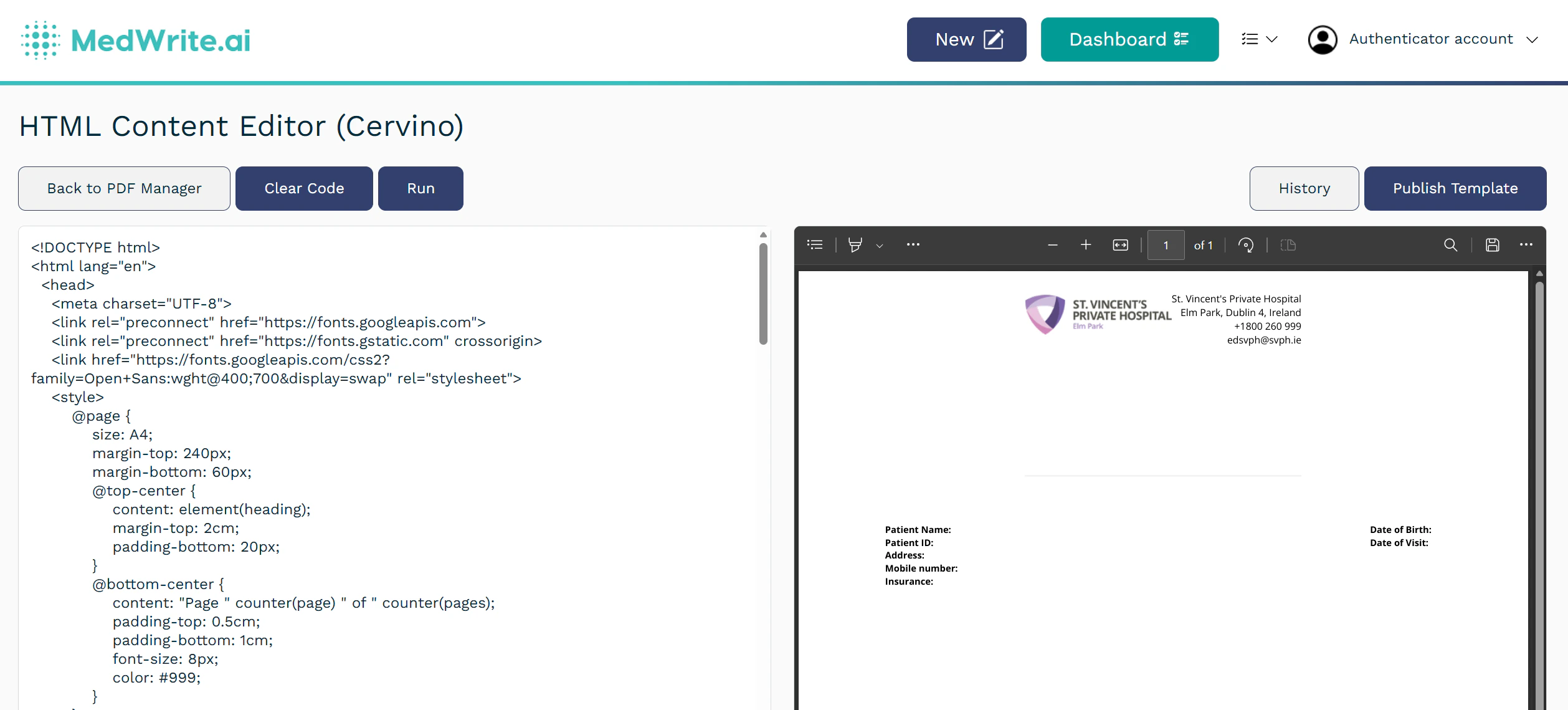
Add a PDF template from Template Management. After you choose organisation, template type, and optional clinic, you design the HTML layout and select variables so the right patient and letter details are inserted dynamically into each exported PDF.
1
Add New Template button
In the templates or documents area, click Add New Template to start adding a PDF template.
Add New Template button.
2
Select Organisation and Template Type
Under Clinic (optional), choose Organisation template or a specific clinic.
Popup: select Organisation and Template Type.
3
Edit the PDF design in the HTML editor
After you select organisation, template type, and optional clinic, the HTML Content Editor opens. Use the HTML to control layout and styling (headings, tables, branding). Add placeholders in the markup for any dynamic details you want in the final PDF (patient name, dates, letter text, and other fields). Open Variables, tick the dynamic fields you want MedWrite to merge for this template, and keep them aligned with your HTML. Use Run to preview (you can add sample context data for testing). When the design is correct, Publish Template to save it for live letters.



.jpeg?fit=max&auto=format&n=5wp1zTLvuLiTjDfk&q=85&s=859af6d32fcbdff7a26459cbea123872)
-1.jpeg?fit=max&auto=format&n=5wp1zTLvuLiTjDfk&q=85&s=f422b0249e02dd7e84bb8fcd454bfa1d)